
Give Your AI a Weather Satellite
How a receive-only SDR and SatDump can turn a passing Meteor weather broadcast into an image inbox with honest source, time and quality records. An educational, researched workflow with no reception t...

Chinese version: 中文版
A small antenna, a USB receiver and an existing laptop can attempt to catch a picture broadcast from a passing weather satellite. The more useful upgrade is an AI inbox that can tell you where the picture came from—and admit when nothing new arrived.
This is a researched build plan, checked November 1, 2026. We did not connect a receiver, test this hardware combination, perform an RF pass, execute the commands below or build/test the proposed watcher. No verified sample download is supplied. Reception remains conditional on your site, hardware and the current downlink.
A postcard that cannot wait for you
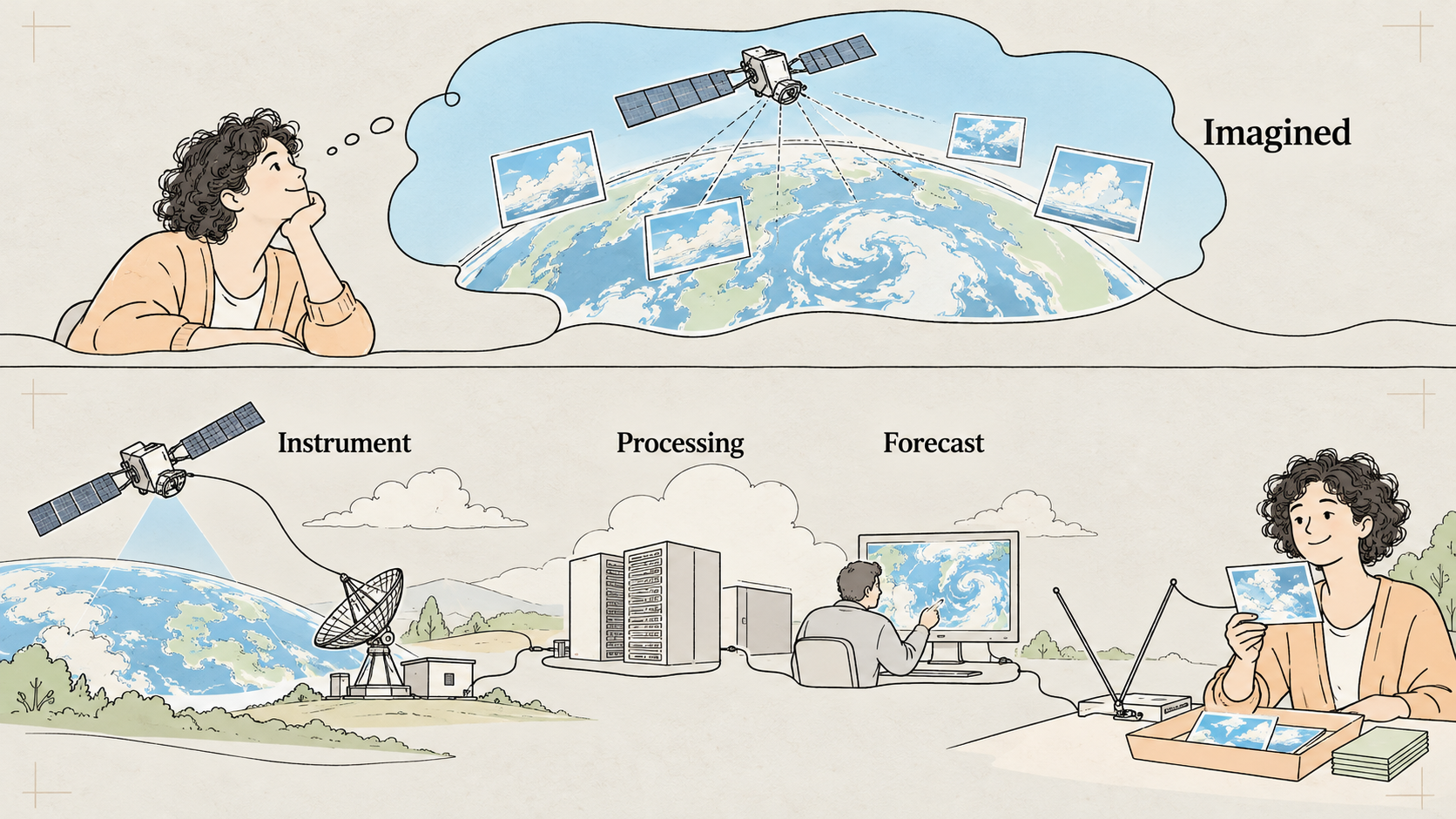
Imagine an orbiting postcard printer sending pieces of an image while you hold a receiving tray below. The real broadcast uses encoded digital packets. The analogy explains why an obstruction or badly timed setup leaves gaps: the satellite keeps moving. An SDR converts the radio signal into samples; SatDump demodulates and decodes a supported signal into image products. A language model has a different job: organise the result and its provenance.
Raw I/Q is a recording of the signal before image decoding. Saving it separately can make later replay possible. A live decoder producing an image does not, by itself, demonstrate that reusable I/Q was saved. The stable SatDump README documents distinct processing paths.
Online promise, professional system, home result

| Level | What is supported | What does not follow |
|---|---|---|
| Online hype | Cheap SDR hardware and dramatic public-data dashboards make satellite reception feel accessible. | A dashboard is not your own reception, continuous global video or secret access. |
| Professional / laboratory | Operational weather observation combines instruments, ground processing, quality control and forecasting systems. WMO documents the MSU-MR instrument. | Professional specifications do not establish your antenna’s reception quality or a hobby forecast’s accuracy. |
| Ordinary home | During a suitable public Meteor LRPT pass, a portable receiver may decode a regional image strip. An original operator documents the method. | You may receive gaps or no useful image. This is intermittent imagery, not a home safety or forecasting service. |
Do not start with a retired target. NOAA-18, NOAA-19 and NOAA-15 were decommissioned in 2025; NOAA explains the retirement. Old APT tutorials still teach concepts, but are not proof that their spacecraft are transmitting now. Meteor status pages can disagree. Confirm the actual spacecraft, current frequency and 72k/80k mode before each attempt; a supported pipeline is not a live-transmitter guarantee.
The $62.90 core kit
USD prices checked November 1, 2026. These are maker listings, not an all-in delivered quote. The core assumes a laptop and USB port you already own. There are no affiliate or book-purchase links.
| Item | USD | Purpose / primary source |
|---|---|---|
| Nooelec NESDR SMArt v5, receiver only, SKU 100701 | $44.95 | Receiver maker listing; antenna not included. |
| RTL-SDR Blog multipurpose dipole antenna kit | $17.95 | Antenna maker listing; telescopic arms, coax and portable mounting accessories. |
| Core total | $62.90 | Before tax, shipping, optional USB extension, clamps or any adapter. |
| Existing laptop / optional extras | Reused / obtain local quote | Check supported software, available USB and recording disk space. |
The antenna’s supplied SMA male lead mates with the specified receiver’s SMA female socket; this stock pair should not need an adapter. Check the exact delivered parts before ordering extras. SMA and RP-SMA are not interchangeable just because the threads look familiar. The maker’s setup guide describes the connectors and mounts.
Nooelec’s datasheet, whose ordering table includes SKU 100701 documents FCC/CE/IC certification. This is manufacturer evidence, not our independent certification audit. We have not verified Japanese approval for this model. Select an exact locally compliant model and check Giteki in Japan where applicable, FCC in the US or CE in the EU as appropriate; those labels do not establish blanket reception legality worldwide. Stay with public weather downlinks and local reception/data rules.
Antenna, pass and software checks
Use the maker’s V-dipole instructions: the long adjustable arms form a horizontal 120-degree V, with the guide’s roughly 53.4 cm per-arm starting length for 137 MHz. Follow its orientation and placement advice and tune from real observations. The older NOAA references on that page do not establish an active Meteor frequency. The kit is for temporary portable outdoor use in fair weather. Keep equipment reachable, secured and away from power lines; no roof work is required. A window position can be convenient but does not guarantee reception.
SatDump is GPL-3.0 open source. On our November 1 check, 1.2.2 was the latest stable release, while master remained active with an October 22, 2026 commit. The examples here are pinned to stable 1.2.2; master has different command layouts. Read the matching README and installed help before use. The stable Meteor definitions distinguish the 72k and 80k pipelines.
Pass predictions use your station location and recent orbital elements. They predict where a spacecraft should be, not whether its transmitter works. CelesTrak currently defaults GP responses to CSV. Request FORMAT=TLE only when your chosen parser requires TLE; validate the response and its freshness rather than assuming the URL returned what old software expects.
Version-pinned command templates

Documentation-derived; not executed for this episode. Only use the live template after verifying that the current spacecraft really uses the shown 137.9 MHz / 72k downlink. Gain 40 is an adjustable starting point. The offline command requires a genuine CS16 input at the stated sample rate; a new filename does not convert a recording.
# DOCUMENTATION-DERIVED; NOT EXECUTED FOR THIS EPISODE.
# SatDump stable 1.2.2 ONLY. Inspect installed help first.
satdump version
satdump sdr_probe

# Supervised LIVE DECODE only if current reports and the signal
# confirm this 137.9 MHz / 72k downlink and matching spacecraft.
# 40 is an adjustable starting gain, not a calibrated setting.
satdump live meteor_m2-x_lrpt ./meteor-pass --source rtlsdr --samplerate 1.024e6 --frequency 137.9e6 --gain 40 --dc_block --timeout 900

# OFFLINE: your own actual CS16 capture at 1.024 Msps, or a
# permitted recording with those exact metadata; not a renamed file.
satdump meteor_m2-x_lrpt baseband ./your-pass.cs16 ./meteor-offline --samplerate 1.024e6 --baseband_format cs16 --dc_block

# Only AFTER a successful supervised manual pass and config review:
satdump autotrack ./autotrack.json
These layouts are supported by the stable README, stable CLI dispatcher and Meteor pipeline definition. Separately configure documented I/Q recording if you want replay; do not assume the live decode command saves it. Do not launch competing processes against one receiver. The autotrack documentation explains the concepts, but its current examples must be checked against your installed version and obsolete NOAA targets replaced. Scheduling waits for a successful supervised manual pass.
The inbox needs an index card
A completed image deserves a manifest recording source kind, spacecraft, capture time, decode time, software version, pipeline, input format, file path and checksum. A sample remains a sample even if decoded today. A failed pass should report failure and the age of the last good capture. Missing capture time should remain unknown.

Preserve unfilled decoder output and original data. The Meteor pipeline includes fill_missing; set and verify fill_missing=false for the evidence output. Interpolation can create a smoother derivative without using generative AI. False colour and map overlays also need labels and source links. Neither a filled strip nor a generated coast is newly received evidence. NASA explains false-colour imagery.
Local files are not automatically private from a cloud-backed Agent. Claude Code’s data-use documentation explains provider processing. Enter exact station coordinates manually in local configuration excluded from Agent-readable paths; do not paste them into the conversation. Keep associated logs private or provide redacted copies. Use a local model for image analysis, or grant separate, specific cloud-processing consent first.
Copy this task into Claude Code or Codex
This prompt asks your Agent to prepare a bounded implementation and evidence checklist. It does not make untested glue into a supplied product, and it deliberately pauses for installation and timer approval.
Claude Code or Codex: help me build a RECEIVE-ONLY weather-satellite picture inbox on my own computer. This is a proposed build, not a tested turnkey integration. First ask my OS, existing receiver and antenna, available disk, and which installation changes I authorize. Use only official SatDump repository/releases/docs. Show the plan before drivers, packages, USB permissions, services or timers are changed.

Pin SatDump stable 1.2.2 for the examples in this article. Run version/sdr_probe and inspect matching installed help, stable README, dispatcher and Meteor pipeline definitions. If my installation differs, stop and provide a version-matched plan; do not silently mix master syntax or install another version. Never treat documentation checks or simulated tests as proof of RF reception.

PRIVACY: do not ask me to paste exact coordinates into chat. Prepare a redacted config template; I will enter precise station coordinates manually in a local file excluded from Agent-readable paths. Do not read that file or location-bearing logs; create only redacted diagnostic copies with my help. Keep location, recordings and images out of cloud prompts. Local storage does not mean local inference. Use a local model for private image analysis, or ask separate, specific consent before a cloud-backed Agent/model reads an image or uploads any data. No default cloud analysis.

Refresh current public Meteor status and orbital elements before each pass. Check spacecraft, NORAD ID, frequency, symbol rate, pipeline and current signal rather than assuming a tutorial's frequency is live. Do not target retired NOAA-15/18/19 APT. Validate the orbital-data response format: CelesTrak currently defaults to CSV; request FORMAT=TLE only if the selected parser requires TLE. Cache responsibly and reject stale/invalid orbital data. A predicted pass is not evidence the transmitter is on.

Give me safe manual antenna instructions from the RTL-SDR Blog maker guide, including its V-dipole section. Check the specified SMA male antenna lead against the receiver SMA female socket, never assume RP-SMA is interchangeable. Recommend only locally compliant hardware and verify the exact model's certification where required; FCC/CE is not proof of Japanese Giteki. No roof work, soldering, transmission, private communications or unsafe unattended outdoor setup. Bias power stays off unless the hardware docs explicitly require it.

If I supply a permitted I/Q recording, validate its source, format, sample rate and checksum and replay it first in a directory labelled sample. No verified sample download comes with this article. If I have none, guide one supervised manual receive-first attempt. Bound duration/disk, serialize SDR access and preserve diagnostics. The example live command decodes live; it does NOT prove raw I/Q is saved. Separately configure and verify documented raw recording before promising replay, and do not run competing SDR processes. Never rename an arbitrary file CS16. Label my real capture live and distinguish sample capture time from decode time.

Inspect the Meteor fill_missing option and set/verify fill_missing=false in the actual processing configuration. Preserve original I/Q when saved, metadata, and unfilled decoder output as evidence. Keep interpolated/filled, false-colour and map-overlay versions separately labelled derivative, with links to their source. Never use generative completion as received evidence.

After decoding, build a local completed-output watcher; this is custom glue, not a SatDump AI feature. Require successful decoder exit, completed dataset/metadata and a nonempty image verified by an image decoder, not just file extension or a file's existence. Wait for complete/stable writes. Atomically emit a manifest with source_kind(sample|live|simulated), satellite/NORAD, capture_start_utc (unknown if unavailable), decoded_at_utc, frequency_hz, software_version, pipeline, input format/sample rate, image_path, image_sha256, decode_exit_code, unfilled_source_path, derivative labels and gaps_or_quality_unknown. Do not invent timestamps or quality scores. Deduplicate hashes. Redact location-bearing metadata before the Agent may read a manifest.

Tests must cover missing/partial input, invalid image, nonzero decode, duplicate image, old capture, malformed/stale orbital elements and interrupted writes. Explicitly label fixtures simulated. Fail closed: retain diagnostics, emit failure/stale status and age of last good capture, never relabel an old image fresh. Do not interpret decoded_at as capture time.

I must obtain one successful supervised MANUAL pass decode before any timer is enabled. Then generate the installed version's autotrack config using its matching schema with my manually entered private location, current NORAD/downlink and bounded output retention. Do not copy obsolete NOAA targets. Keep optional HTTP status API disabled, or localhost-only if separately approved; open no inbound ports. Dry-run/test locally and show exact start, graceful stop, timer disable and restart instructions for my OS before asking approval to enable. If manual reception fails, stay manual and investigate; do not schedule repeating failures.

The Agent may remind me about a status-conditioned pass, notify a newly validated image and report failures/last-capture age. Broad cloud descriptions require uncertainty and approved inference. It must not forecast, replace official warnings, monitor a child/pet or decide anyone is safe. End with physical steps I must perform, evidence actually obtained, tests not yet run and all unresolved conditions.
Five households, five sensible configurations

| Situation | Useful approach | Boundary |
|---|---|---|
| Living alone | One manual weekend pass, local gallery and a pass reminder. | Keep official weather alerts; no sole emergency source. |
| Older relatives or children | A supervised science session with stable stand and secured cables. | No unattended outdoor work or safety conclusions from clouds. |
| Pets | Place antenna and leads out of reach; use an indoor image gallery. | Satellite clouds do not monitor an animal’s condition. |
| Renting / no drilling | A permitted temporary tripod or suction mount; offline learning if the sky is blocked. | No roof access, drilling or promised reception through glass. |
| Travelling | Put temporary outdoor gear away; view dated captures or practise offline. | Never present the old image as current or leave fair-weather gear exposed. |
What counts as success
First record the installed version and configuration assumptions. Then validate a permitted recording, if available, or attempt supervised reception and save your own recording. A successful manual pass produces a real valid decode with honest provenance. Only then consider a timer. Test failed/partial/invalid inputs, duplicate suppression, stale images and interrupted writes with fixtures labelled simulated. Confirm graceful stopping and disabling actually work. Software tests cannot certify your sky view.
The useful Agent behaviours are modest: remind you about an eligible pass, announce a new verified image, and admit failure or staleness. It may describe broad visible cloud structure with uncertainty under the approved processing boundary. Official forecasts and warnings still do their own job. Your AI has a receiving tray and an index card; its responsibility is to keep them together.
Visual sources and evidence boundary
The episode uses one website screenshot: the Nooelec NESDR SMArt v5 product page, SKU 100701. It is shown only to illustrate the listed hardware; prices and availability may change. The other planned website views are educational illustrations, not screenshots. Explanatory art and cloud maps are illustrative, not measured satellite output. No image in this companion establishes that this production received a spacecraft.
Watch more first-principles field guides on Wiki4What, or read the essays at blog.wiki4what.com.